EASTEL Login – Access Your EASTEL Account Securely
How to Login to Your EASTEL Account
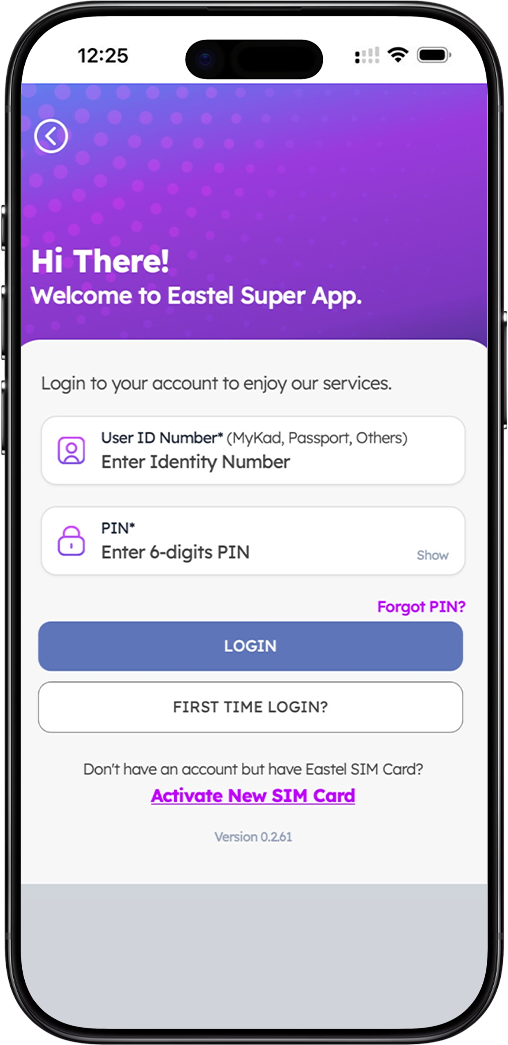
Step 1: Download the EASTEL Super App
The EASTEL login process is designed to be simple and secure. To access your EASTEL account, you must first download the EASTEL Super App from the official app store. The app is available for both iOS and Android devices. Simply search for "EASTEL Super App" on the Apple App Store or Google Play Store, and install it on your smartphone. The EASTEL Super App is your central hub for managing your EASTEL SIM card, checking data usage, reloading credit, and accessing exclusive EASTEL services.
Step 2: Enter Your User ID Number
Once you have installed the EASTEL Super App, open the application and you will be greeted with the login screen. The first field requires your User ID Number. This can be your MyKad (Malaysian Identity Card), Passport number, or any other approved identification document that you used during your EASTEL SIM registration. Simply enter the number exactly as it appears on your identification document. If you are unsure which ID you used during registration, please refer to your EASTEL registration confirmation SMS or contact EASTEL customer support for assistance.
Step 3: Enter Your 6-Digit PIN
After entering your User ID, the next field asks for your 6-digit PIN. This is the personal identification number you created during your EASTEL SIM registration process. The PIN field includes a "Show" option that allows you to temporarily reveal your PIN to verify you have entered it correctly. This is particularly helpful if you are logging in on a private device. Ensure you enter all six digits accurately. If you have forgotten your PIN, do not worry — the app provides a "Forgot PIN?" option to help you reset it securely.
Step 4: Tap "LOGIN" to Access Your Account
Once you have entered both your User ID and PIN, tap the "LOGIN" button. The EASTEL system will verify your credentials. If both are correct, you will be granted access to your EASTEL account dashboard. From there, you can view your current plan, check your balance, manage add-ons, track data usage, and perform various self-care functions. The login process takes only a few seconds when your credentials are entered correctly.
Forgot Your EASTEL Account PIN?
How to Reset Your EASTEL PIN via OTP
If you have forgotten your EASTEL 6-digit PIN, the EASTEL Super App provides a simple reset process. On the login screen, tap the "Forgot PIN?" link located below the PIN field. This will direct you to the PIN recovery page where you can reset your credentials securely.
Step 1: Enter Your EASTEL Mobile Number
On the "Forgot PIN" screen, you will be prompted to enter your EASTEL mobile number. This is the phone number associated with your EASTEL SIM card. Use the format shown in the example (e.g., 012 345 6789). Make sure you enter the number correctly, as the OTP verification code will be sent to this exact number.
Step 2: Receive and Enter OTP Verification
After submitting your EASTEL mobile number, tap "Send OTP". You will receive a one-time password (OTP) via SMS to your EASTEL mobile number. Enter this OTP in the verification screen. The OTP is time-sensitive, so please complete this step promptly. This verification ensures that only the legitimate SIM owner can reset the PIN, adding an extra layer of security to your EASTEL account.
Step 3: Create a New 6-Digit PIN
Once your OTP is verified, you will be directed to create a new 6-digit PIN. Choose a PIN that is easy for you to remember but difficult for others to guess. Avoid using sequential numbers like "123456" or repetitive patterns. Confirm your new PIN by entering it a second time. After successful confirmation, your new PIN will be activated immediately, and you can use it to log in to your EASTEL account.
First Time Login? Activate Your EASTEL SIM First
Don't Have an Account But Have EASTEL SIM Card?
If you have already purchased an EASTEL SIM card but have not yet registered it, you will see an option at the bottom of the login screen that says "Activate New SIM Card". This is because your EASTEL account is created during the SIM registration process. You must complete the registration before you can log in.
How to Activate Your EASTEL SIM Card
To activate your EASTEL SIM card, tap the "Activate New SIM Card" link on the login screen. This will redirect you to the EASTEL online registration portal, where you will be guided through a simple 4-step process: SIM verification, mobile number selection, ID verification, and final submission. Once your EASTEL SIM is successfully activated, you will receive a confirmation SMS, and you can then log in to your EASTEL account using the User ID (your registered identification number) and the PIN you created during registration.
Why Use the EASTEL Super App?
Complete Control of Your EASTEL Account
The EASTEL Super App is more than just a login portal — it is your complete self-care tool. Once logged in, you can view your remaining data balance, check voice minutes and SMS quotas, purchase reload vouchers, subscribe to data add-ons, and monitor your usage history. The app also provides access to exclusive EASTEL promotions and loyalty rewards.
Secure Account Management
EASTEL prioritizes the security of your account. The login process uses encrypted credentials, and all sensitive actions such as PIN resets require OTP verification sent directly to your EASTEL mobile number. This ensures that even if someone knows your User ID, they cannot access your account without also having access to your SIM card.
24/7 Access to Customer Support
Through the EASTEL Super App, you can also reach EASTEL customer support directly. Whether you need assistance with your plan, have billing inquiries, or require technical support, the app provides easy access to help resources, including live chat and support ticket submission.
Frequently Asked Questions About EASTEL Login
What User ID should I use for EASTEL login?
Your EASTEL User ID is the identification number you used during SIM registration. This can be your MyKad (Malaysian Identity Card) number, Passport number, or other approved identification document. If you have registered multiple EASTEL SIM cards under the same ID, the system will recognize your account based on the SIM you are currently using.
What if I enter the wrong PIN multiple times?
For security purposes, entering an incorrect PIN multiple times may temporarily lock your account. If this happens, use the "Forgot PIN?" option to reset your PIN via OTP. Once reset, you can log in immediately with your new PIN.
Can I login to EASTEL from a web browser?
Currently, EASTEL account access is optimized through the EASTEL Super App. The app provides the most secure and feature-rich experience for managing your EASTEL SIM and services. You can download the EASTEL Super App from the Apple App Store or Google Play Store.
What should I do if I don't receive the OTP?
If you do not receive the OTP SMS within a few minutes, ensure your EASTEL mobile number is correct and that your device has network coverage. You can also try tapping "Resend OTP" after waiting a short period. If the issue persists, contact EASTEL customer support for assistance.
Access Your EASTEL Account Anytime, Anywhere
Download the EASTEL Super App today to login, manage your SIM, check balance, and enjoy exclusive EASTEL services. Secure login with User ID and PIN. Forgot PIN? Reset easily via OTP.
