EASTEL Super App – Download the Official EASTEL App for All Devices
Download EASTEL Super App for Android
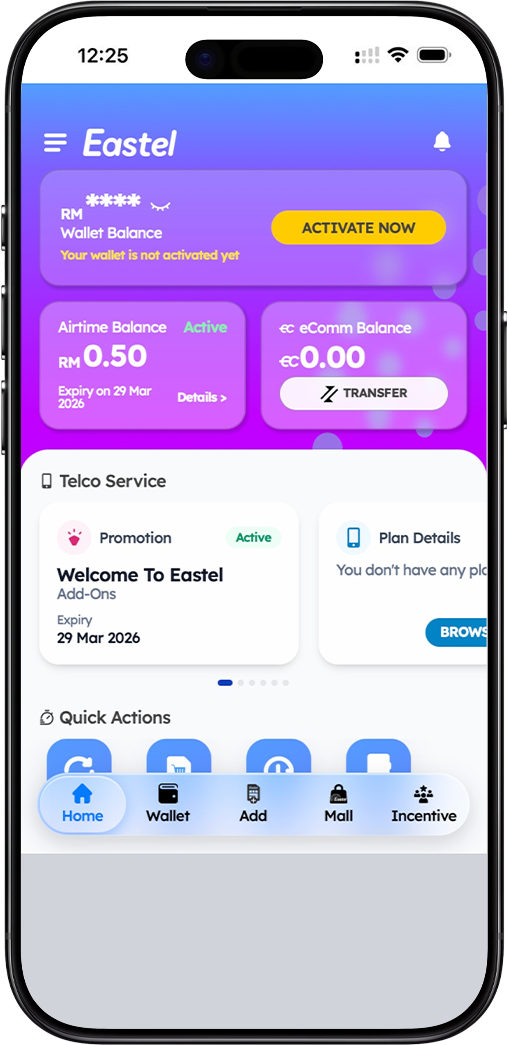
Step 1: Open Google Play Store on Your Android Device
To download the EASTEL Super App on your Android smartphone or tablet, begin by opening the Google Play Store application. Ensure your device is connected to a stable internet connection, either via WiFi or mobile data. The Google Play Store is the official and safest source for downloading EASTEL applications on Android devices.
Step 2: Search for "EASTEL Super App"
In the Google Play Store search bar, type "EASTEL Super App" and press search. Look for the official EASTEL application in the search results. The app icon features the official EASTEL branding. Verify that the developer name matches EASTEL to ensure you are downloading the legitimate application. Avoid third-party app stores or unofficial sources that may host modified or unsafe versions.
Step 3: Tap "Install" and Wait for Download to Complete
Once you have confirmed the correct EASTEL Super App, tap the "Install" button. The app will begin downloading and installing automatically. The download size is optimized for quick installation. After installation completes, you will see an "Open" button. Tap it to launch the EASTEL Super App and begin your EASTEL account login or SIM activation process.
Download EASTEL Super App for iOS (iPhone & iPad)
Step 1: Open Apple App Store on Your iOS Device
For iPhone, iPad, or iPod Touch users, the EASTEL Super App is available exclusively through the Apple App Store. Unlock your iOS device and locate the App Store icon on your home screen. Tap to open it. Ensure your device is running a compatible iOS version (iOS 12 or later recommended) and that you are signed in with your Apple ID.
Step 2: Search for "EASTEL Super App" in App Store
Tap the search tab at the bottom of the App Store screen and enter "EASTEL Super App" in the search field. Press search and look for the official EASTEL application in the results. The official app will display the EASTEL logo and the developer name as EASTEL. Be cautious of any similarly named apps that are not published by EASTEL.
Step 3: Tap "Get" Then "Install" to Download
Once you have identified the correct EASTEL Super App, tap the "Get" button, followed by "Install". You may be prompted to authenticate using Face ID, Touch ID, or your Apple ID password. The app will download and install automatically. After installation, tap "Open" to launch the EASTEL Super App and access your EASTEL account.
Download EASTEL Super App for Windows
Step 1: Visit the Official EASTEL Download Page on Your PC
To download the EASTEL Super App for Windows desktop or laptop, open your preferred web browser (such as Microsoft Edge, Chrome, or Firefox) and navigate to the official EASTEL download page. From this page, you can access the Windows version of the EASTEL application. Ensure you are on the official EASTEL website to avoid downloading counterfeit software.
Step 2: Click the Windows Download Option
On the EASTEL download landing page, you will see download options for different platforms. Locate and click the Windows Download button. This will initiate the download of the EASTEL Super App installer file (typically in .exe format). The download time may vary depending on your internet connection speed.
Step 3: Run the Installer and Follow Setup Instructions
Once the download is complete, locate the installer file in your computer's downloads folder. Double-click the file to run the installer. You may see a security prompt asking for permission to install — click "Yes" or "Run" to proceed. Follow the on-screen instructions to complete the installation. After installation, you can launch the EASTEL Super App from your desktop or start menu and log in to manage your EASTEL account.
Download EASTEL Super App for macOS
Step 1: Access the Official EASTEL Download Page on Your Mac
For Mac users, the EASTEL Super App is available for download through the official EASTEL website. Open Safari, Chrome, or any browser on your Mac and go to the EASTEL download page. This page provides the macOS version of the EASTEL Super App, optimized for Apple's desktop operating system.
Step 2: Click the macOS Download Button
On the download landing page, locate the macOS Download button. Click it to begin downloading the EASTEL Super App installer for Mac. The file will typically be in .dmg format. Depending on your browser settings, you may be prompted to choose a save location or the download may start automatically.
Step 3: Install and Move EASTEL App to Applications Folder
After the download completes, open the downloaded .dmg file. A window will appear with the EASTEL Super App icon. Drag the EASTEL app icon into the Applications folder. This will install the app on your Mac. You can then open the EASTEL Super App from your Applications folder or Launchpad. The first time you open it, you may need to allow the app to run by going to System Preferences > Security & Privacy and clicking "Open Anyway" if prompted by macOS security settings.
Why Download the EASTEL Super App?
Complete EASTEL Account Management at Your Fingertips
The EASTEL Super App is your all-in-one solution for managing your EASTEL SIM card and mobile services. Once you have downloaded and installed the app, you can log in using your User ID (MyKad, Passport, or other identification) and 6-digit PIN. From the app dashboard, you can check your remaining data balance, monitor voice call and SMS usage, purchase reload vouchers, subscribe to data add-ons, and view transaction history.
Secure and Convenient Self-Care Portal
The EASTEL Super App offers a secure environment for all your account management needs. All sensitive actions, such as PIN resets and plan changes, require OTP verification sent directly to your EASTEL mobile number. This ensures that your account remains protected even if your device is lost or compromised. The app also provides direct access to EASTEL customer support, including live chat and help desk options.
Exclusive Promotions and Rewards
EASTEL Super App users enjoy exclusive access to special promotions, loyalty rewards, and limited-time offers that are not available elsewhere. By downloading the official EASTEL app, you ensure you never miss out on data bonuses, discounted reloads, or special event promotions. Stay connected and get the most value from your EASTEL SIM.
Frequently Asked Questions About EASTEL Download
Is the EASTEL Super App free to download?
Yes, the EASTEL Super App is completely free to download on all platforms. There are no charges for downloading or installing the application. Simply visit the Google Play Store, Apple App Store, or the official EASTEL download page to get the app at no cost.
Which devices are compatible with EASTEL Super App?
The EASTEL Super App is compatible with Android devices running Android 8.0 (Oreo) and above, iOS devices running iOS 12 and above, Windows 10 and Windows 11 PCs, and macOS 10.15 (Catalina) and later versions. For the best experience, ensure your operating system is updated to the latest version.
Do I need an EASTEL SIM to use the EASTEL Super App?
While you can download the EASTEL Super App without an active EASTEL SIM, you will need to have an EASTEL SIM card and complete the registration process to log in and access the app's full features. New users can use the "Activate New SIM Card" option within the app to begin their EASTEL journey.
What if I cannot find the EASTEL Super App on my app store?
If you are unable to locate the EASTEL Super App on the Google Play Store or Apple App Store, ensure your device's operating system is up to date and that your device is compatible. You may also visit the official EASTEL download page for alternative download links or contact EASTEL customer support for assistance.
Is the EASTEL Super App available in multiple languages?
Yes, the EASTEL Super App supports multiple languages to serve EASTEL customers across Malaysia and beyond. The app interface is available in English and Bahasa Malaysia, with additional language support being added in future updates.
Get the EASTEL Super App Today
Download the official EASTEL Super App for Android, iOS, Windows, or macOS. Manage your EASTEL SIM, check balance, reload data, and enjoy exclusive rewards. Free and secure.
